Picture an IT team that sees a post in a developer group: someone has tested a dozen Thai OCR models running locally on a 12 GB graphics card, and the best one reads Thai text almost perfectly.
Free. Data never leaves the company. And it looks like enough to replace a whole department's document keying.
Plenty of teams are at exactly this point — and most don't yet know what lies between a day-one demo and a system the accounting team can actually use. This article walks that road, one stage at a time.
Day one: wow
Installing a model such as Typhoon OCR, dots.mocr or PaddleOCR takes less than a day. Drop in a tax invoice and the Thai text comes out complete and correctly spelled. Even the table looks like a table.
Everyone in the room thinks the same thing — this is easier than we expected.
Which is half right. Reading is the easiest part of this job, and it is the only part OCR does.
Week one: you have text, but accounting wants data
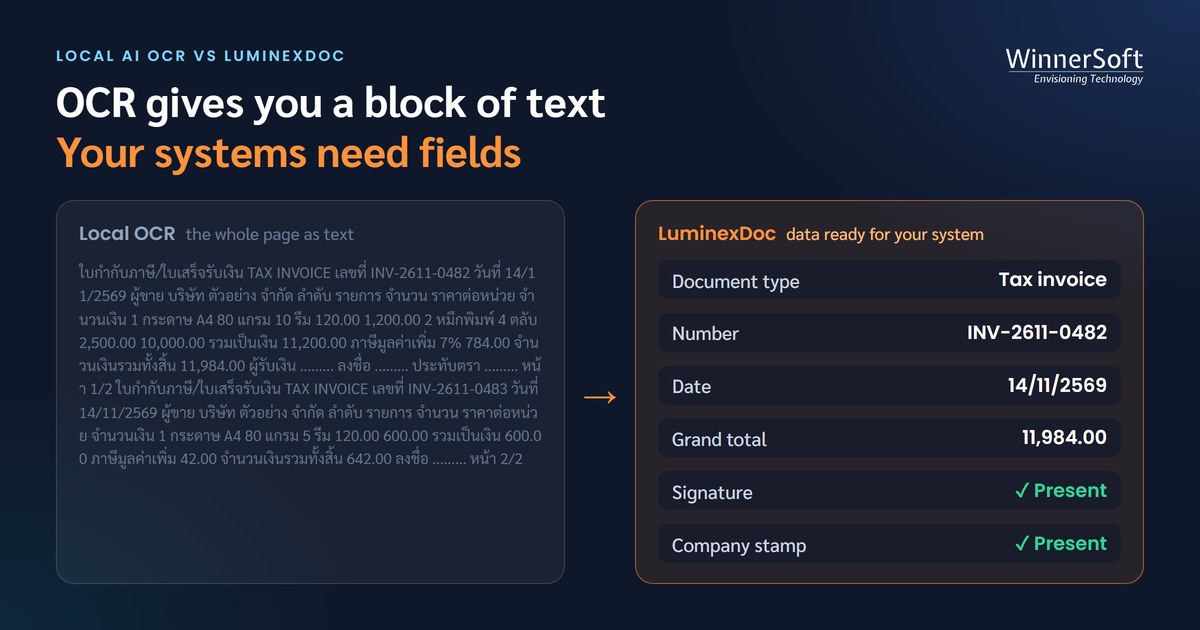
The first problem shows up when it's time to send results into a system. What the model returns is the whole page as text — some format it as tidy Markdown. But the ERP doesn't want text. It wants the invoice number, date, tax ID, pre-VAT amount and each line item, separated into fields.
The team starts writing regex to pull values out. It works for the first supplier. It breaks on the second. The third is worse.
Because a hundred suppliers means a hundred layouts. One writes "ยอดรวมทั้งสิ้น", another "Grand Total". Some show the amount before and after discount. Some hide the document number inside a table. Picking the number that should be booked takes an understanding of the whole document, not just being able to read the characters.
OCR can tell you what the page says. It doesn't decide which value is the answer.
That kind of judgement takes a language model that can reason. So the team goes looking for one — and hits the next wall.
Week two: the VRAM wall
Open models that reason do exist. But the ones good enough to trust with financial documents are all large, and the GPU memory (VRAM) they need grows with them straight away.
| Model (example) | Size | VRAM at full precision (BF16) | VRAM at 4-bit |
|---|---|---|---|
| Typhoon OCR 1.5 | 3B | about 7 GB | about 3 GB |
| Qwen2.5-VL 7B | 7B | about 17 GB | about 6 GB |
| Qwen2.5-VL 32B | 32B | about 70 GB | about 20 GB |
| Qwen2.5-VL 72B | 72B | about 150 GB | about 45 GB |
| gpt-oss-120b (text only, no images) | 120B | — | about 80 GB (as stated by the developer) |
The 12 GB card from day one is enough for an OCR model, not for a model that reasons. Real accounting work usually means moving to a workstation or data-centre card with 48 GB or more, or several cards together.
Compressing to 4-bit makes it fit, but accuracy drops too, so everything has to be measured on real documents again. And once the machine is bought there is power, cooling, upkeep and the queue — thousands of pages a day on one card can mean a long wait.
The project that started with the word "free" now has a hardware quotation attached.
Month one: the real documents arrive
Test documents are usually clean files. Once accounting starts sending the real thing, three more problems appear at once.
The first is tables. Merged cells, borderless tables, line items that run across pages, numbers packed too tightly to separate into columns — this is where models' scores differ the most. Worse than misreading is misreading quietly: a number shifts one column over, the output still looks like a complete table, and nobody notices until the totals don't add up.
The second is signatures and stamps. Real documents have signatures over printed text, company stamps slanted across the amount, watermarks across the page. OCR tries to read all of it as characters. Sometimes stray characters creep in; sometimes the line under a signature vanishes. And if accounting asks "has this one been signed off?", that is not a question OCR was built to answer.
The third is document sets. One scanned file holds a purchase order, a delivery note, a tax invoice and a receipt across dozens of pages. OCR reads page by page. It doesn't know pages 3 to 5 are one invoice, or what page 6 is. Splitting the set (segmentation) and identifying each document (classification) is another system to build before a single field can be extracted.
Month two: "can you add one more field?"
Parts of the system start working, and the requests start coming in — a new document type, the purchase order number as another field, the total taken after discount, the data sent to one more system.
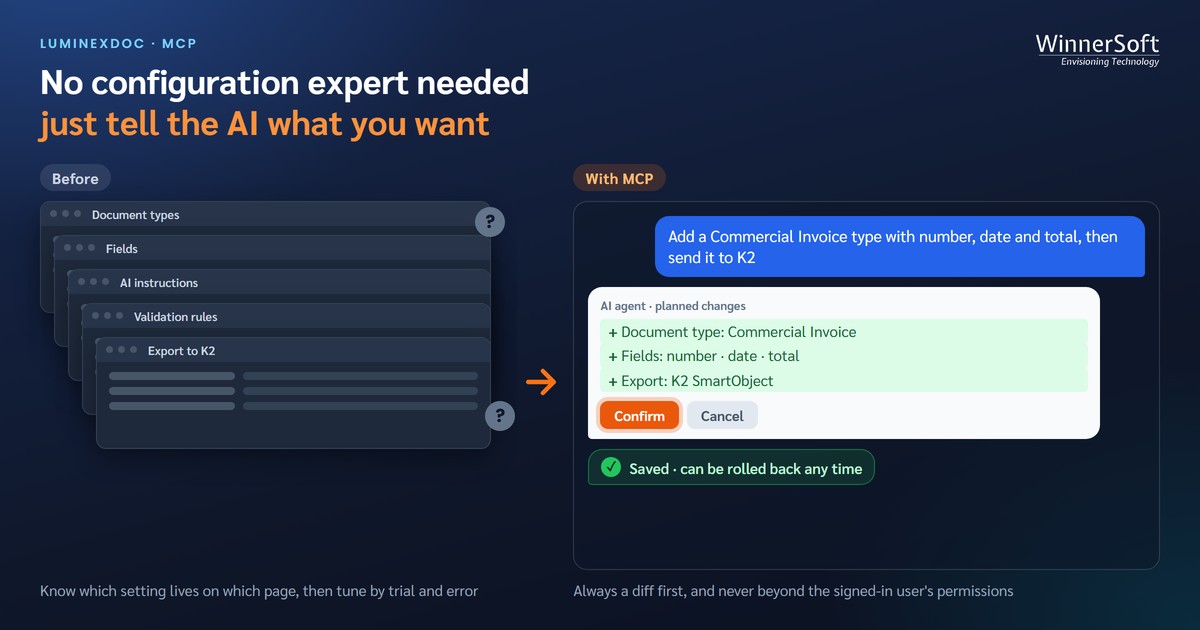
In a home-built system, every request means editing code, testing and redeploying, by the people who wrote it and nobody else. The accounting team that actually owns the work queues up behind developers every time the business moves. And if the person who wrote it leaves, the system stops growing with them.
Fine-tuning the model to be more accurate is technically possible. It takes a large set of labelled documents, a bigger GPU than the one you run on, people who know machine learning, and a fresh evaluation every time a new model version comes out. For a request as small as "use the amount after discount", that road is far too long.
The question nobody can answer: can we trust this number?
This is the most important stage, and the one most teams never think about at the start.
Almost every home-built system has one AI read the document, and a single AI always returns an answer, whether it is sure or guessing. A right answer and a wrong guess look exactly the same.
The day the accounting manager asks "are we sure this total is right?", the team has two answers left: trust everything and accept that a wrong number may slip into the books, or have someone check every field on every document — which takes nearly as long as typing it in to begin with.
One AI has nothing to compare against — so it can't tell you where it's wrong.
What makes the data trustworthy is having several AIs read the same document independently, none seeing the others' answers. Fields where they all agree can pass. Fields where they don't are a clear signal for a person to look. Disagreement isn't a weakness — it's the one thing that shows where the mistakes are hiding.
On your own hardware, though, three models means three times the VRAM from the table above, and models from the same family or trained on similar data tend to make the same mistakes in the same places. Cross-checking only works when the AIs are genuinely different.
Add it all up: why this takes months
Getting an OCR model to read a document takes a day. A system people can actually use needs every layer described above.
- Taking documents in from email, folders or scanners
- Splitting and classifying document sets
- Extracting fields with a model that understands context, for each document type
- Validation, such as the total having to equal the sum plus tax
- Cross-checking with more than one AI, to know which fields are doubtful
- A screen for people to review and correct, with a record of who changed what
- Sending the data into the ERP or accounting system
- Ongoing upkeep when forms change, new model versions arrive or the hardware has trouble
Each layer is serious development work in its own right. The biggest cost isn't the graphics card — it's the time of the people who build it and keep it running.
So is local AI a bad idea?
No — when it's matched to the job. Documents never leave the machine, there's no per-page cost, and you control everything.
The simple dividing line: local AI suits documents that are simple and fixed-template — the same form, the same fields, in the same place on every page. When the layout never changes, you don't need a model that reasons; extraction rules written once keep working.
| Suits local AI | Doesn't suit local AI | |
|---|---|---|
| Kind of document | One form, fixed layout, rarely changes | Varied layouts that change with the sender, needing interpretation |
| Examples | Leave requests, expense claims or approval forms the company designed itself · goods-received notes or inspection checklists printed from your own system · receipts from a single POS system | Invoices and tax invoices from many suppliers · contracts where terms must be found in the text · documents with complex tables · Thai government correspondence |
| What the system must do | Read the text, then take values from known positions | Understand which value is the answer, cross-check, and know which fields need a person |
Other jobs that can start with local OCR straight away:
- RAG or document search, where you need the whole page as text rather than separate fields
- Converting old archives to text for long-term storage
- Teams with machine learning skills, ready to run the system themselves long term
- Data rules that forbid any external service at all
But if your work sits in the right-hand column — invoices from many suppliers, contracts, complex tables or government correspondence — every stage described above will happen, and local AI is not the road that pays off.
Whichever model you pick, test several on your own documents. The one that wins on someone else's documents may not win on yours.
If the destination is data in your systems
Every stage above happens after reading — and that is the part LuminexDoc was built to do.
- Three AIs from different makers read every field independently; fields they agree on pass, and only fields where they disagree reach a person
- Uses AI that understands document context, picking the right value even when every supplier lays out its form differently — with no hardware for you to buy
- Splits document sets and classifies each document automatically, before extraction
- Extracts the fields you define, instructed in plain language, with no templates
- Checks whether a document has been signed or stamped
- Click a field and the system draws a box at that spot on the real document image, so review is quick
- Document types, fields, validation rules and destinations are all configurable without touching code — and can be driven by an AI agent through MCP
- Matches data across documents and sends it straight into an ERP, SQL Server or K2
- Can be installed on-premises for organisations with data requirements
Local OCR answers "what does this page say?" Business document work needs to know "what is the value in this field, is it right, and where should it go?" — and those two questions are much further apart than they look on day one.
Before choosing a direction, try testing both on your real documents. Contact us to arrange a test with LuminexDoc.