Invoice processing is where most finance teams lose the most time to the least rewarding work. Every supplier invoice has to be read, keyed into the accounting system, matched against a purchase order, checked for VAT and totals, routed for approval, and filed. Multiply that by hundreds or thousands of invoices a month — across dozens of vendor formats, in Thai and English — and accounts payable becomes a bottleneck that grows with the business. Automated invoicing solves this, but only if the automation actually connects to the accounting platform you already use. An AI that extracts perfect invoice data is worthless if a person still has to retype it into SAP. This guide explains how modern automated invoicing integrates with popular accounting platforms, and what to look for so the data flows end to end.
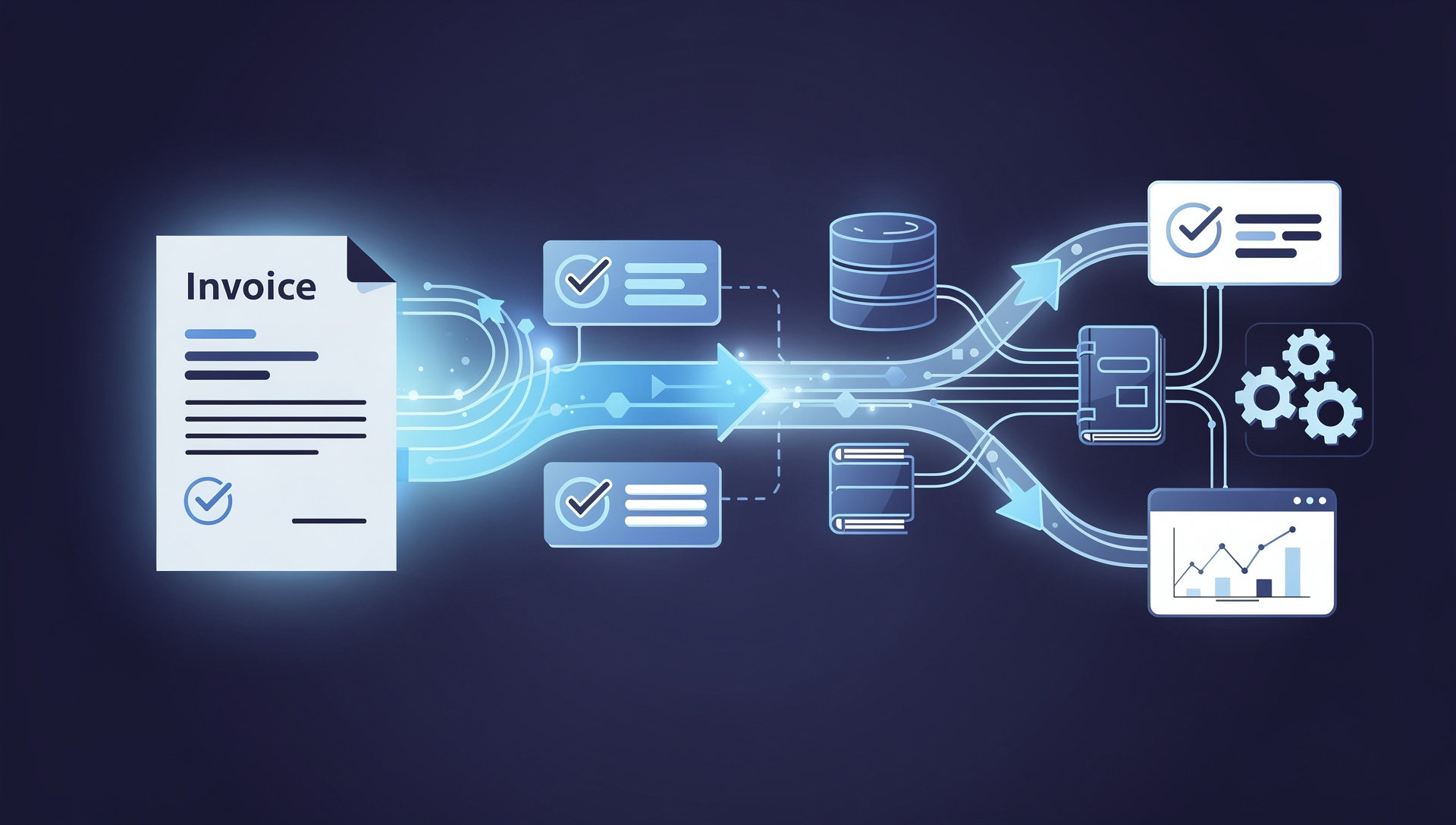
The key shift is that automated invoicing is no longer about scanning and storing — it is about extraction plus integration. AI reads each invoice, understands the fields regardless of layout, validates them, and then writes structured data directly into your accounting or ERP system through a connector or API. Done right, an invoice arrives by email and appears as a posted, matched entry in your ledger minutes later, with humans involved only for the exceptions. The difference between a tool that does this and one that does not comes down to integration depth — which is exactly what finance teams should evaluate first.
How Automated Invoicing Works End to End
- Capture: Invoices arrive from any source — email attachments, a scanning inbox, supplier portals, or photos from the field — and are ingested automatically without manual sorting.
- Extract: AI reads each invoice and pulls the fields that matter — vendor name, tax ID, invoice number, date, line items, quantities, unit prices, VAT, and total — across any layout, in Thai or English, without a template per vendor.
- Validate: The system checks the math, confirms VAT is calculated correctly, and matches the invoice against the purchase order and goods receipt (2-way or 3-way match). Discrepancies are flagged, not silently passed through.
- Route: Invoices that need sign-off are sent through an approval workflow based on amount, cost center, or vendor, with full audit history.
- Post: Validated data is written straight into the accounting platform as a draft or posted entry — no re-keying — and the original document is attached for audit.
Integrating With Popular Accounting Platforms
The value of automated invoicing is realized only when extracted data lands cleanly in the system your finance team already lives in. Strong solutions offer pre-built connectors for the major platforms and an open API for everything else. Here is how integration typically works across the platforms Thai enterprises use most:
- SAP (S/4HANA, Business One): The most common enterprise target. Automated invoicing posts vendor invoices via SAP's APIs or IDoc/BAPI interfaces, with purchase-order matching against existing SAP POs. Critical for large Thai manufacturers and conglomerates already standardized on SAP.
- Oracle (Fusion, NetSuite): Invoice data flows into Oracle's AP module through REST APIs, populating vendor records, line items, and tax fields, then triggering Oracle's native approval and payment workflows.
- Microsoft Dynamics 365 (Finance & Business Central): Deep integration via the Dataverse and Dynamics APIs lets extracted invoices appear as vendor bills ready for approval, a popular path for mid-to-large Thai enterprises on the Microsoft stack.
- QuickBooks and Xero: For SMEs and growing companies, invoice data is pushed via well-documented APIs to create bills automatically, with vendor and chart-of-accounts mapping handled during setup.
- Thai and regional ERP/accounting systems: Many Thai organizations run local platforms such as Express, FlowAccount, PEAK, or custom in-house ERPs. A capable automated invoicing solution integrates through API, file export (CSV/XML/JSON), or direct database connection — and handles Thai-specific requirements like the withholding tax (ภ.ง.ด.) and VAT (ภ.พ.30) context, Buddhist-era dates, and bilingual vendor names.
What to Look For in an Automated Invoicing Solution
- Native connectors plus an open API: Pre-built connectors for your platform shorten the project from months to weeks; an open API future-proofs you for systems you add later.
- True 2-way and 3-way matching: The solution should match invoices to purchase orders and goods receipts inside your ERP, not just extract numbers and leave matching to a human.
- Thai tax and format handling: Correct VAT calculation, withholding tax context, Thai Buddhist-era dates, and bilingual Thai-English invoices are non-negotiable for Thai finance operations.
- Template-free extraction: New vendor formats should work on day one. If every new supplier requires a template, the automation will fall behind your vendor list.
- Confidence scoring and exception handling: Only genuinely uncertain fields should reach a human, with clear flags — not silent errors posted straight to the ledger.
- Audit trail and PDPA alignment: Every extraction, correction, and posting should be logged, with the source document attached, supporting both internal audit and PDPA compliance.
- Deployment flexibility: On-premises or Thai-hosted private cloud options matter for organizations that cannot send financial documents to overseas servers.
The Business Case
The returns from automated invoicing are concrete and fast. Processing time per invoice typically drops from 15-20 minutes of manual handling to under a minute of mostly automated flow. Data entry errors — transposed digits, wrong vendor, miskeyed tax amounts — fall toward zero because the data is extracted and validated rather than retyped. Approval cycles shorten because invoices route automatically instead of sitting in an inbox. Finance staff move from repetitive keying to exception handling and analysis. And because the process is auditable end to end, month-end close gets faster and cleaner. Most organizations recover their investment within 6-12 months, and the savings scale as invoice volume grows rather than requiring more headcount.
Automated invoicing is only as good as its integration. Perfect extraction means nothing if someone still has to retype the data into your accounting system.
How LuminexDoc Automates Invoicing for Thai Enterprises
LuminexDoc by WinnerSoft is an AI document processing platform built to automate invoice capture from end to end — and to put the data where your finance team needs it. It reads invoices in Thai and English across any layout without per-vendor templates, validates totals and VAT through a 3-way AI consensus check, and integrates with accounting and ERP platforms including SAP, Oracle, Microsoft Dynamics, and Thai local systems via connectors, API, or structured file export. Because it understands Thai tax context, Buddhist-era dates, and bilingual documents natively — and offers on-premises deployment for organizations with strict data-residency rules — it fits Thai finance operations without compromise. To see exactly how it would work with your accounting platform, visit our LuminexDoc page at /luminexdoc or contact our team at /contact for a free assessment using a sample of your real invoices. We will show you the extraction accuracy and the integration path on your own data.