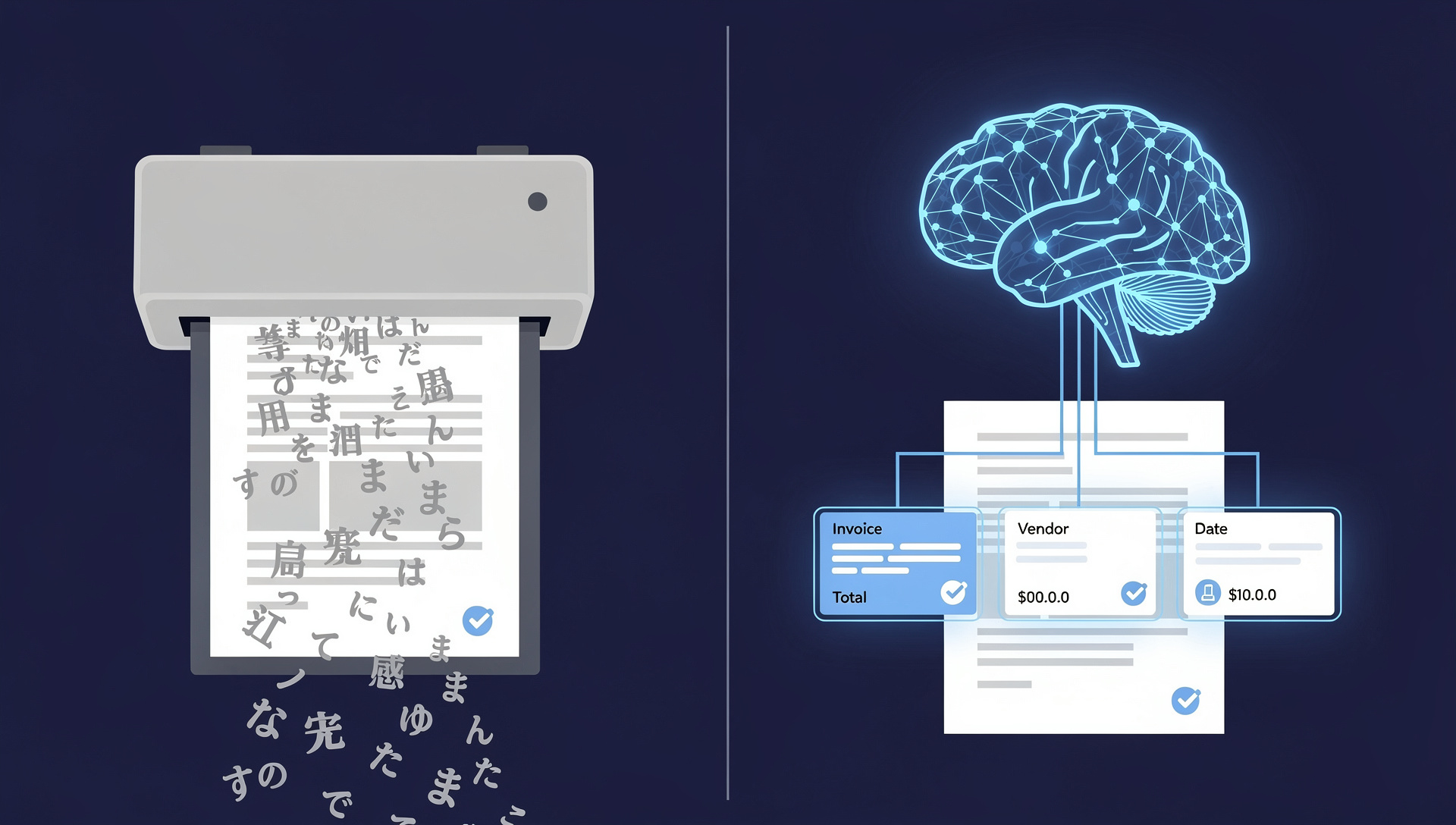
"AI" and "OCR" are often used as if they mean the same thing. They do not. OCR (Optical Character Recognition) is a decades-old technology that converts the picture of text — a scanned page or a photo — into machine-readable characters. AI document processing is a broader, modern category that uses computer vision, natural language processing, and machine learning not just to read characters, but to understand what a document means and extract the exact data you need. Put simply: OCR tells you what characters are on the page; AI tells you that '฿1,284,500' is the total amount, that the vendor is registered under tax ID 0105551xxxxxx, and that this invoice is due in 30 days. For any organization trying to automate invoices, contracts, or forms, understanding this distinction is the difference between a project that works and one that quietly fails.
This confusion has real consequences. Many Thai companies buy a tool marketed as "AI document processing," discover it is really just OCR with a template editor, and abandon the project after months of disappointing accuracy. Others over-engineer a problem that plain OCR could have solved. This article explains exactly where OCR ends and AI begins, so you can choose the right approach for your documents — and understand why LuminexDoc was built as an AI platform rather than another OCR engine.
What OCR Actually Does
OCR is a pattern-matching technology. It scans an image, identifies shapes that look like letters and numbers, and outputs them as editable text. That is genuinely useful — OCR is what lets you turn a scanned PDF into a searchable document, or copy text out of a photo. Modern OCR engines are fast, cheap, and reasonably accurate on clean, printed, well-aligned text. But OCR has no understanding of meaning. It does not know whether '12/06/2026' is an invoice date or a delivery date. It cannot tell that two different vendor names refer to the same company. It outputs a flat stream of characters and leaves all the interpretation to you — usually a human, or a brittle set of rules and templates.
- OCR converts images to text. That is the entire job — recognizing characters, not understanding them.
- OCR needs structure. To extract specific fields, traditional OCR relies on fixed templates that map 'the text in this rectangle is the invoice number.' Change the layout and the template breaks.
- OCR does not validate. It will happily return '8' where the real digit was '6', with no awareness that the value is wrong.
- OCR struggles with the messy real world. Skewed scans, stamps over text, handwriting, mixed Thai-English lines, and low-resolution phone photos all degrade OCR accuracy quickly.
What AI Adds on Top
AI-powered document processing uses OCR as one component — the character-reading step — and then layers intelligence on top of it. Computer vision models locate tables, signatures, logos, and stamps regardless of where they sit on the page. Natural language processing understands context: it knows that 'ยอดรวมทั้งสิ้น', 'Grand Total', and 'Total Amount Due' all point to the same concept, even though the words and positions differ across vendors. Machine learning models, trained on thousands of similar documents, predict the most likely correct value for each field — and improve every time a human corrects them. The result is a system that extracts the data you actually want, from documents it has never seen before, without a template for each layout.
- AI understands meaning, not just characters. It maps messy, varied wording to the structured field you need — vendor, tax ID, line items, due date, VAT — across thousands of layouts.
- AI is template-free. Because it recognizes contextual patterns, it can process a brand-new invoice format on day one without anyone building a template first.
- AI handles unstructured content. Contracts, emails, handwritten notes, and free-text remarks — where OCR alone produces unusable output — are exactly where AI extracts meaningful data.
- AI validates and scores confidence. Modern platforms run multiple models and compare results, flagging only genuinely uncertain values for human review instead of returning silent errors.
- AI learns over time. Every correction makes the model more accurate on similar documents, so accuracy climbs toward 99% over months of operation — something static OCR can never do.
AI vs OCR: Side by Side
- Goal — OCR: turn an image into text. AI: turn a document into structured, validated business data.
- Layout changes — OCR: needs a new template for each format. AI: adapts automatically to formats it has never seen.
- Accuracy on real documents — OCR: typically 70-85%, dropping further on poor scans. AI: 95-98%, improving with use.
- Thai language — OCR: reads Thai characters but misreads tone marks, spacing, and mixed Thai-English. AI: parses Thai addresses, Buddhist-era dates, and bilingual text with genuine language understanding.
- Error handling — OCR: returns wrong values silently. AI: flags low-confidence fields for review via consensus validation.
- Best fit — OCR: digitizing clean printed pages for search/archive. AI: automating high-volume, high-variety workflows like accounts payable, KYC, and contracts.
A Real Example: Reading an Invoice
Imagine 500 supplier invoices arriving each month from 80 different vendors, in both Thai and English, some scanned, some emailed as PDFs, a few photographed on a phone. With OCR alone, you would get 500 blobs of text. To extract the vendor, tax ID, line items, and total, you would build and maintain a template for each of the 80 layouts — and every time a vendor changes their format, processing breaks until someone fixes the template. With AI document processing, the system reads each invoice, recognizes the relevant fields by context no matter where they appear, validates the numbers across multiple models, and pushes clean data straight into your accounting system. New vendor formats are handled automatically. Processing time per invoice drops from roughly 15 minutes to under 30 seconds, and the values that do need a human are clearly flagged rather than buried.
When OCR Is Enough — and When You Need AI
OCR alone is a fine choice when your goal is simply to make documents searchable or to digitize a clean, consistent, single-layout form. If you are scanning a library of printed reports so people can search them, OCR does the job at low cost. But the moment your goal shifts from 'read the text' to 'extract specific, reliable data and feed it into a business process' — especially across many formats, in Thai, at volume — OCR alone will not get you there. That is where AI document processing becomes necessary, not optional. The test is simple: if a human currently has to read each document and decide what the data means, you need AI, not just OCR.
OCR reads the characters. AI understands the document. Automation only works when your software does the second part — not just the first.
Where LuminexDoc Fits
LuminexDoc by WinnerSoft is an AI document processing platform, not an OCR tool. It uses OCR internally as the character-reading layer, then applies AI to understand each document, extract the fields you need, and validate them through a 3-way AI consensus check that flags only genuinely uncertain values for review. It is built specifically for Thai enterprises — with native Thai language understanding, Buddhist-era date handling, bilingual document support, and flexible deployment including on-premises for organizations with strict data-residency requirements. The result is template-free extraction that stays accurate as your vendors and formats change, integrates directly with your accounting and ERP systems, and gets smarter the more you use it. If you have been disappointed by an 'AI' tool that turned out to be OCR in disguise, visit our LuminexDoc page at /luminexdoc, or contact us at /contact for a free assessment using your own real documents — we will show you the accuracy on your data, not a generic benchmark.