Everyone selling AI document processing tells you the same thing: the AI reads faster than a person.
We timed a process that runs every day and found that sentence is only half true — and the missing half is the more important one.
This article is what the numbers told us about where the value of AI document processing actually sits, and why it is not where most people look for it.
What we measured
At a Japanese automotive parts manufacturer in Thailand, we timed every step of processing a single document, comparing the existing way of working against the same process running on LuminexDoc.
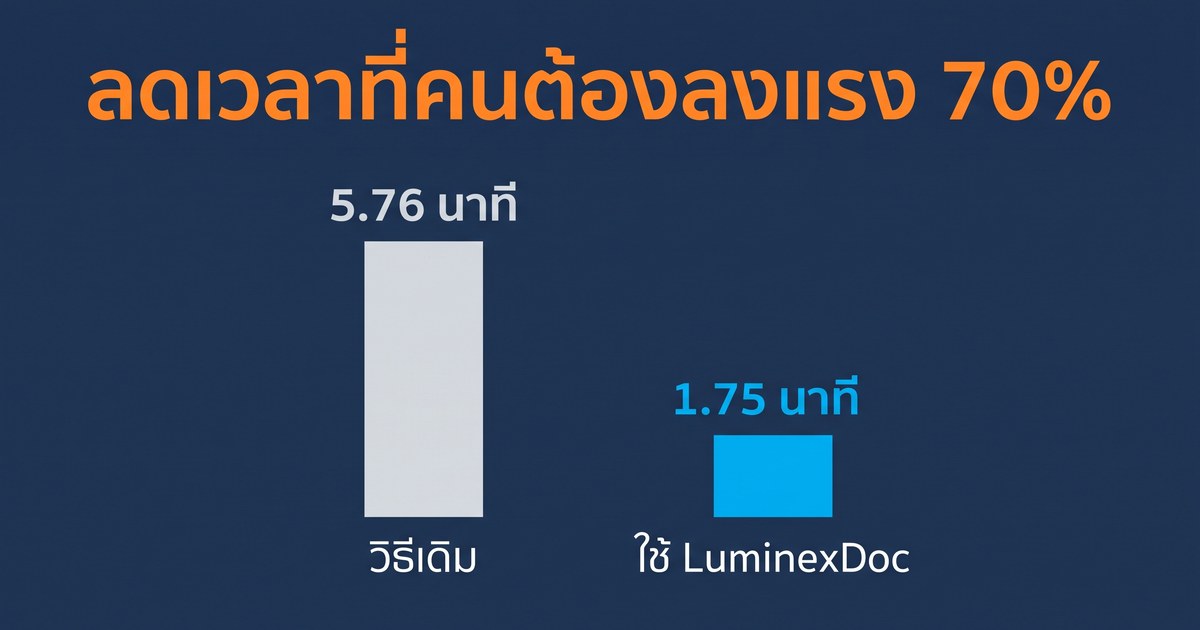
One clarification, because this is measured differently from how the figure is usually quoted. We counted only the minutes a person has to spend, not the machine's processing time. The 1.08 minutes the AI spends reading is unattended batch work — the operator uploads and walks away rather than sitting and waiting.
Counting elapsed time instead gives 51%, which understates the result and does not reflect what the organisation gets back.
89% of the saving comes from one step
This is the part that made us think again. Broken down by where the time went:
- Posting to SAP — 4.43 minutes down to 0.86, a saving of 3.57 minutes, which is 89% of the total
- Renaming the PDF — 0.40 minutes down to zero, a saving of 0.40 minutes
- Checking the data — 0.34 minutes, now handled by the AI, a saving of 0.28 minutes
Almost nine tenths of the time saved has nothing to do with reading the document.
It comes from the step after the reading — the one where a person used to look at the paper and type the numbers into SAP field by field. When the data arrives from LuminexDoc already structured and ready to post, that step stops being typing and becomes confirming.
The value is not that the AI reads the page. It is that the work at the end of the process stops being re-keying.
Follow that thought and it becomes the strongest argument for extending the same approach to every process that ends in data entry, in any department.
We are not hiding the cost it adds
The new way is not better in every column. It adds two steps the old process did not have:
- Verifying the result in the web interface, plus 0.15 minutes per document
- Checking the template, plus 0.14 minutes per document
That is 0.29 minutes per document, and it is already netted off the 4.01. Saying so plainly is more credible than presenting a saving that appears to cost nothing, and the figure falls as confidence in the extraction grows.
Why traditional OCR cannot do this
OCR is an eye. It can tell you which characters sit at which coordinates, but not what they mean. An AI-LLM is closer to a brain: it understands context, checks the arithmetic, and adapts to a layout it has never seen.
The difference is clearest in configuration. Take extracting the net total from an invoice.
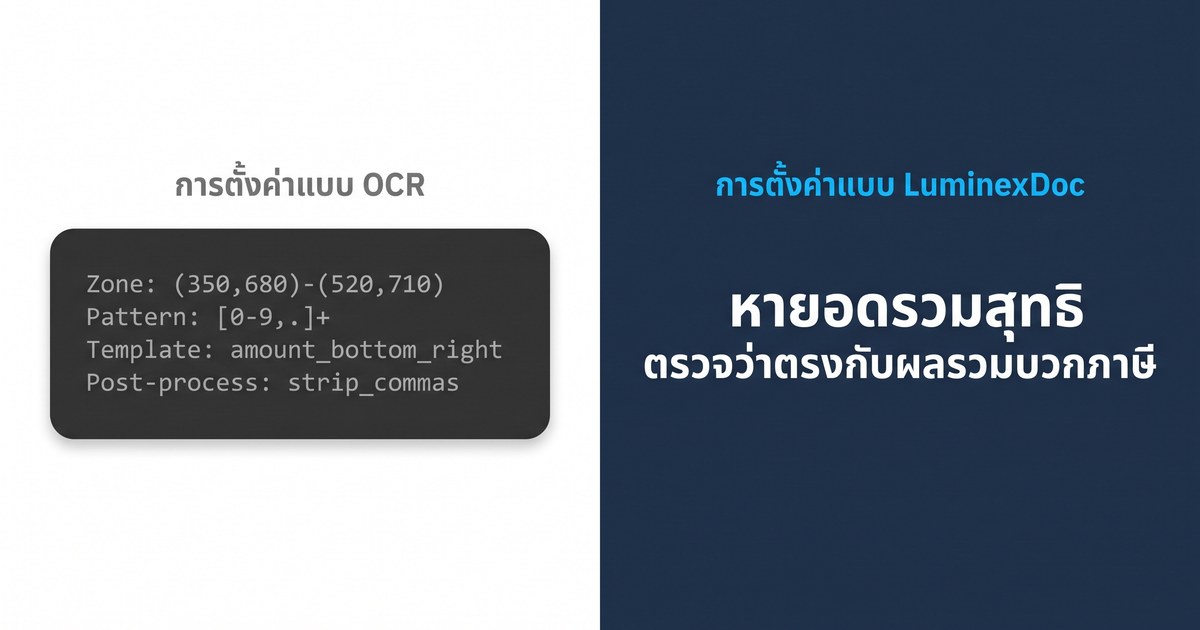
The OCR side is tied to pixel coordinates: one vendor shifts their layout and the whole configuration breaks and has to be rebuilt. The LuminexDoc side states what is wanted rather than where it sits, so any layout works — and your team can add a new document type without raising a ticket and waiting on a vendor.
The documents OCR cannot touch at all
OCR copes with structured documents like invoices. There is another category it cannot handle from the outset, because the information that matters is not in a field — it is buried in the prose.
- Contracts — expiry dates, penalty terms and renewal dates spread through the paragraphs
- Internal memos — OCR cannot tell which sentence is a decision and which is a salutation
- Meeting minutes — resolutions embedded across several paragraphs, mixed in with the discussion

In a test on the live system on 26 July 2026, we gave it a contract written in Japanese, with no template built for it beforehand and nobody on the team able to read Japanese. It returned the signing date, the delivery deadline, the contract value split before and after tax, the daily late-delivery penalty rate — which sits inside clause 4 rather than in any field — and the delivery location with an English rendering alongside it.
Every field was correct, and all three AI providers agreed 100%. The original text is always stored exactly as written; the English translation is delivered alongside it, never instead of it.
How would you know if one AI read it wrong?
That question is why LuminexDoc has three AI providers — Gemini, OpenAI and Claude — read the same document independently and then compares every field. Where they agree, the value passes automatically. Where they disagree, it goes to a person.
The result is that nobody checks every page. People check the points the system is unsure about, which is where people are worth the most anyway.
Already running in production
LuminexDoc is not a proposal on paper. Five document types are extracted and in daily production use today: tax invoices, invoices, receipts, debit notes and credit notes.
See the numbers on your own documents
The 70% above came from one customer's process. What your organisation gets depends on where the time sits in yours — which is exactly why we would rather you did not take the number in this article on trust.
The two-week POC is free. We run LuminexDoc on 20–50 of your real documents, redacted however you need, and send back a detailed accuracy report. If the result does not meet the standard you set, there is no contract and no risk.

Design Partners get the Founding Rate at 50% off locked for three years, direct influence over the product roadmap, and a dedicated senior adviser. Get in touch to start the free POC, or call 092-359-9942.
A note on the numbers: the 95–98% accuracy figure shown on the product page refers to benchmark results for Gemini, OpenAI and Claude extracting data from documents. The accuracy on your own documents is validated during the POC.